Breaking Botslab
Dash cameras, despite their popularity and widespread deployment, have remained a relatively unexplored category for vulnerability researchers. Breaking Botslab recounts our year-long research project analyzing one of the most popular dash cameras available on the market. What we found led to the identification of vulnerabilities affecting several devices. This project demonstrates that even high-end consumer-grade IoT devices can lack the most fundamental security.
While many new cars are now shipping with built-in cameras to automatically record incidents, help in insurance claims, or to surveil driver awareness levels, not all do. Consequently, many car owners have turned to dash cams to help protect their vehicles. These widely available devices offer a practical and affordable way to safeguard an owner’s vehicle.
Dash cameras can assist with determining responsibility in the event of an accident, fighting traffic tickets, or catching crazy road incidents that get uploaded to YouTube attracting millions of views (and, of course, result in untold fame and internet points for the owner)!
According to market research firm Grand View Horizon, these concerns have been reflected in steady market growth; the dash cam industry in Canada is expected to grow at a rate of 9 percent a year over the next four years. Contributing to this growth, British Columbia recently passed Bill M 217, mandating the installation of dash cameras in all commercial vehicles. While not required, many Uber and Lyft drivers also install them, in order to provide some level of safety assurance for passengers.
Existing Literature on Dash Cam Security
Despite their popularity, dash cameras remain a relatively unexplored category of IoT devices. However, this has started to change.
In a recently published white paper “DriveThru Hacking: Fast Food, Faster Data Breach” researchers Penelope Chua, George Chen, Alina Tan, Chee Peng Tan, Ri-Sheng Tan, and Benjamin Cao detailed their attempt to find vulnerabilities across 40 brands of dash cameras used in their home country, Singapore. These vulnerabilities were then used in a 10-stage automated attack, allowing them to “[conduct] an automated drive-through compromise on dashcams, resulting in major privacy breach within 6 minutes.” The distinguishing factor in this research—aside from the scale of course—was their retrieval of video that was stored on the devices, and the subsequent transcription of its audio content and their use of artificial intelligence to geolocate the owner’s whereabouts based upon road signs and other visual indicators.
At DEF CON 32, Hyo Jin Lee and Hanryeol Park presented Inside Dash Cam Custom Protocols and Discovered 0days, which described their work that focused on the analysis of the firmware of 9 consumer-grade dash cams. The result of this research was the identification of a range of vulnerabilities including missing authentication, command injection, and buffer overflow.
We hope to contribute to this growing literature with our project on dash camera security, building on the work presented by the aforementioned researchers.
Target Selection
It was with these factors in mind that we decided to investigate the security of one of Amazon’s most popular high-end dash cams—our target for this project was the Botslab G980H series of dash cams.
We would describe this as the “Cadillac” of dash cams, providing 4K video footage (front, side, and rear), support for GPS tracking, and hands-free voice control. All of this coming in at a whopping $269.99 CAD (thanks to the “Limited-time deal”).
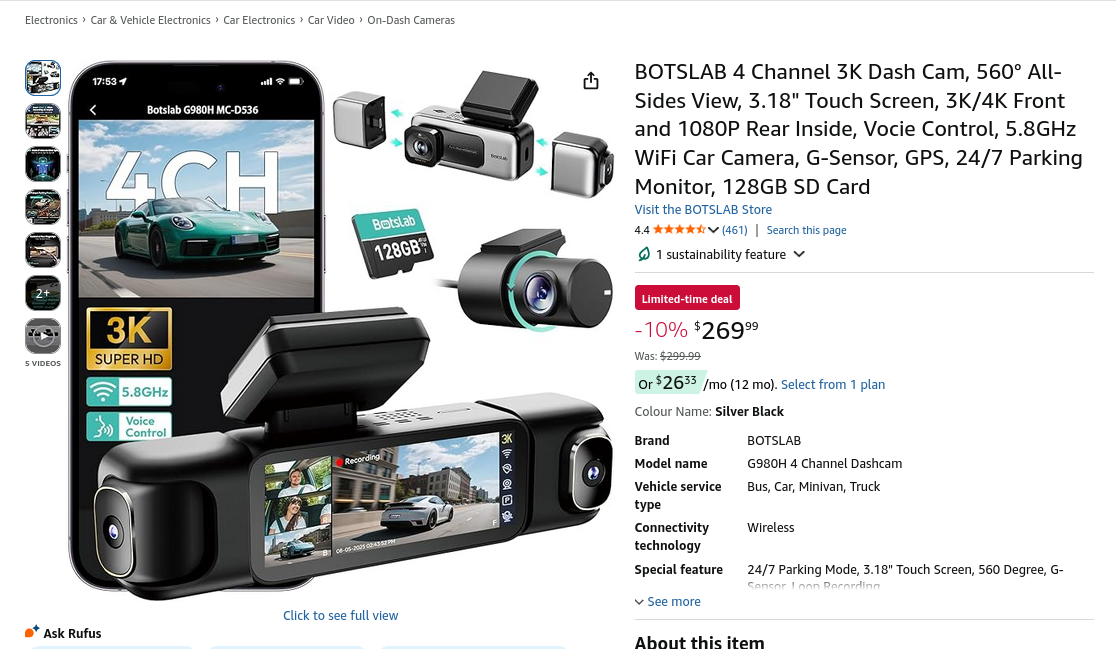
Selection of this target was based on the features it had available, the popularity of the product, and the price. Given the cost, we inferred that most consumers would consider this to be a high quality product and, consequently, secure.
We also picked up the “little brother” of this high-end model, (the Camry of dash cams perhaps?) which was slightly more modest in pricing, only costing us $120 CAD. We purchased it, in part, to compare the features of the two based on the firmware that we would later retrieve and to have a more affordable option in the event that a device was rendered inoperable through our testing. It is quite a bit easier to justify replacing a $120 camera, as opposed to one that costs $269.99.
In this research project, we set out to answer the following question, “Could we, as an unauthenticated attacker, disrupt the video communications in a temporary or permanent way?”
Our reasoning for this question was somewhat straightforward; these devices are intended to provide reliable streaming footage in the event of an incident. If that footage were disrupted, it could result in challenges posed by disputes which require it, resulting from insurance claims or lawsuits.
Traffic Analysis
While many dash cams these days come with a SIM card to support internet connectivity, the Botslab dash cams do not.
The absence of this narrowed the attack surface and added some additional constraints to our research; basically, any vulnerabilities that we exploit need to be done within range of the device's Wi-Fi hotspot or Bluetooth. Additionally, if we compromise the device in some way, we will be unable to receive a “call back” to a remote command and control server—these dash cams never connect to that big scary place we call the world wide web.
Since it lacked internet connectivity, how exactly does the dash cam communicate? How does it receive updates?
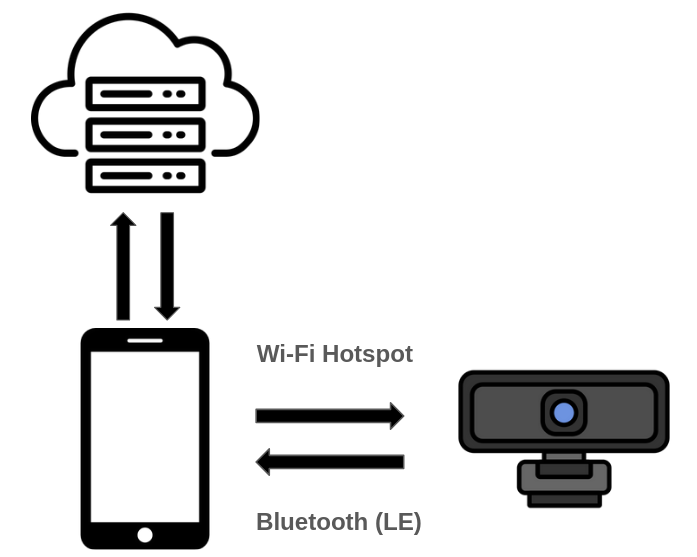
In order to facilitate video upload and storage of footage in the cloud, and to receive firmware updates, the dash cam communicates with your phone—over an advertised Wi-Fi hotspot or Bluetooth Low Energy (BLE)—and your phone, in turn, reaches out to the cloud. Through these mediums, your phone can modify the settings of the camera, upload new firmware, watch the live video feed, and save clips.
After receiving the dash cam and beginning our analysis, we quickly noticed that each dash cam’s SSID was unique, starting with “Botslab-” followed by a short string of alphanumeric characters. This realization caused a light bulb to go off in our heads: Why not check Wigle to see how many of these devices have been seen in the wild?
A quick search returned a modest 9700 devices—not nearly as many as we had expected for the Cadillac of dash cams!
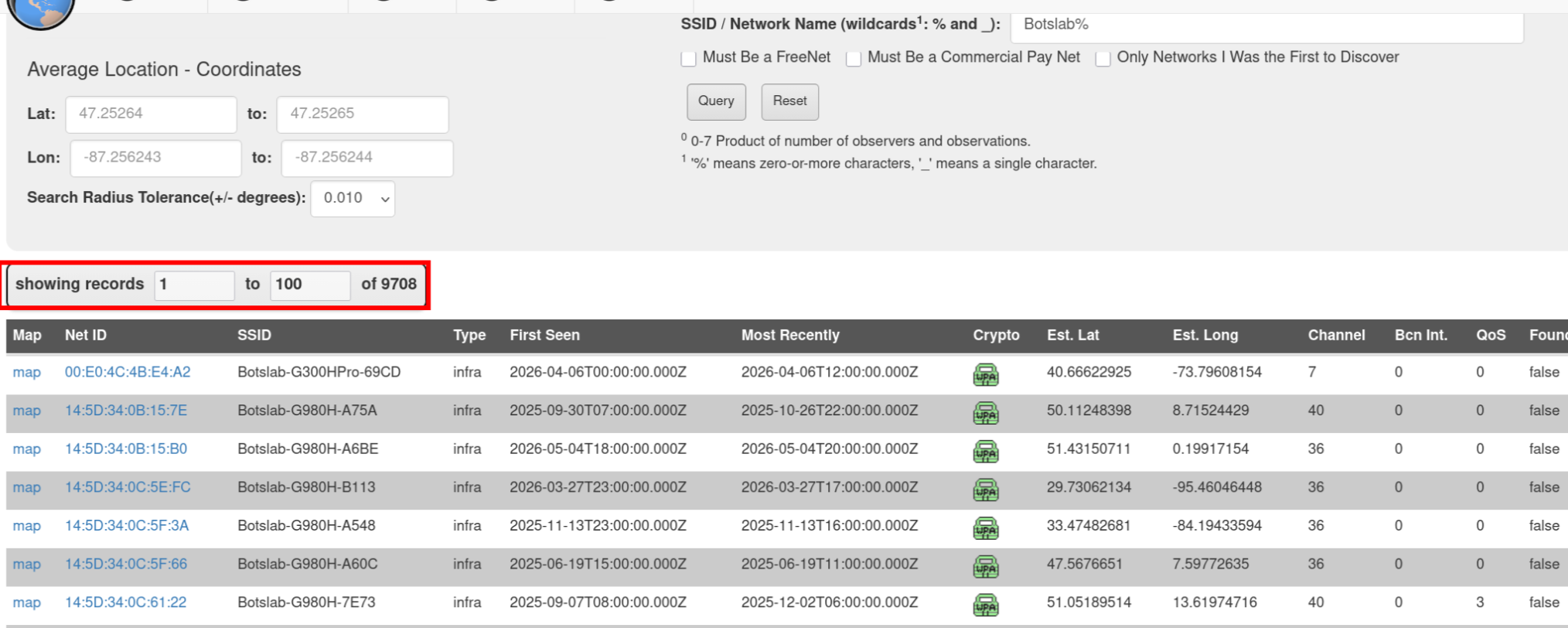
We determined that this number isn’t a completely accurate reflection of the number of devices in the wild. As the batteries which power these devices are relatively small, the Wi-Fi hotspot is deactivated while a vehicle is not in operation. Therefore, any wardrivers that collect SSIDs uploaded to Wigle are unlikely to spot the devices unless the vehicle the dash camera was installed in was turned on.
Once we had associated the device to our Botslab account, it was time to analyze the traffic from the mobile application to the camera. This is when we were presented with a unique challenge.
Typically, when we want to analyze an IoT device’s network communications, we would connect it to an access point we control which is advertised by mitmrouter, allowing us to easily capture inbound and outbound traffic by bridging the connection through our host.
If you’re interested in learning how we’ve used mitmrouter to hack an IoT device before, check out Part 1 of our Hacking Furbo series.
However, because the device never connects to an external network, this simply wouldn’t be possible. Instead, we decided to install the tcpdump utility on our Android phone. This would allow us to capture all of the network traffic between the two devices.
adb shell tcpdump -s 0 -w /sdcard/capture.pcap
Then, we interacted with the device through the mobile application to trigger communications with the camera, pulled down the capture over Android Debug Bridge (ADB), and reviewed the PCAP file on our host.
We found that most of the communications were facilitated over a TCP connection on port 7878.
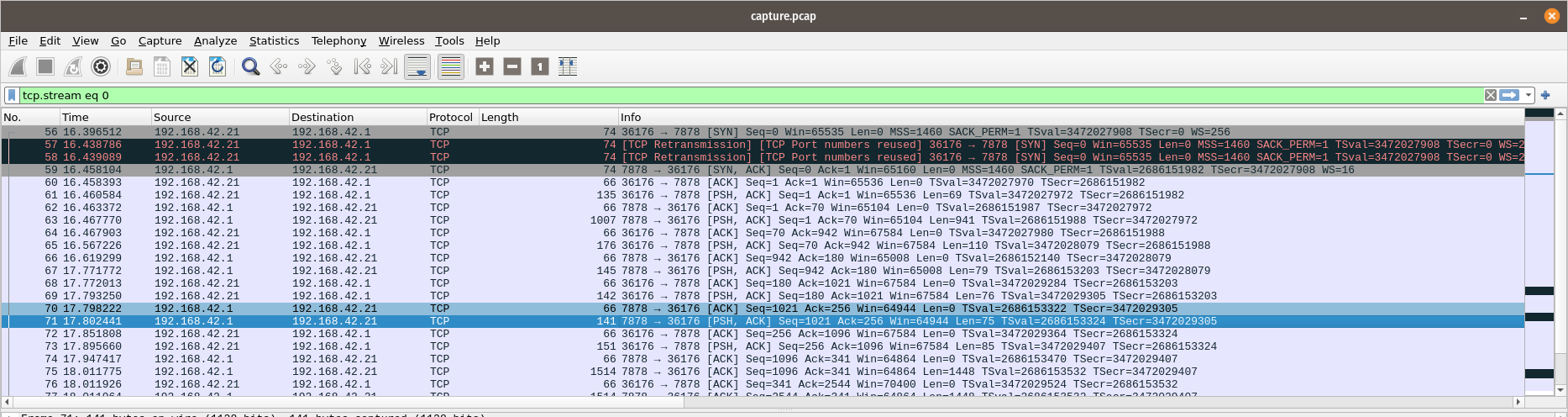
Following the TCP stream revealed that this was a JSON formatted data blob. The traffic from our phone is highlighted in red and the blue highlights the response from the dash cam.
We also found in this capture that the live video feeds were being streamed to the mobile application over an RTSP connection.
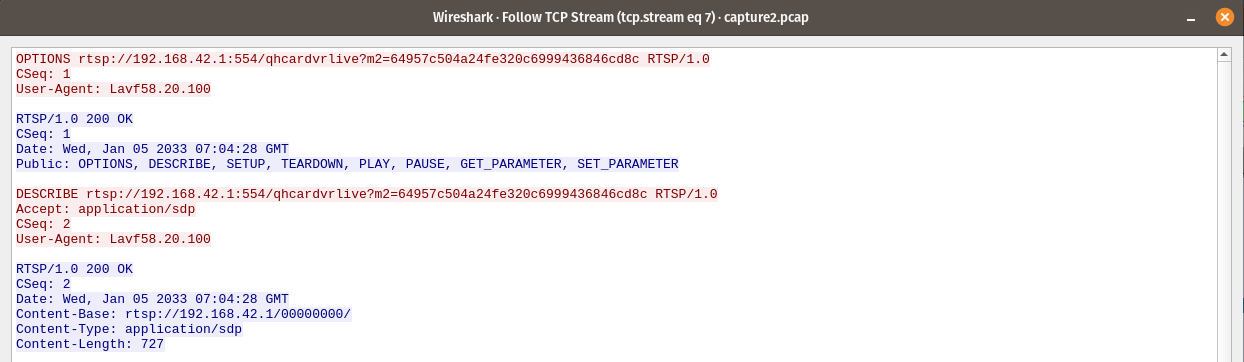
When retrieving a video stored on the dash cam, the phone would make a request to the web server on the device.

Each of these communication protocols has something in common: the use of the m2 parameter with a hash following it—the authentication token. By reverse engineering the mobile application, we were later able to determine that this authentication token is derived from an md5 hash of a hardware identifier on the mobile phone.
Having developed a basic idea of how the device communicates with the mobile application over its hotspot, we moved onto the next phase: device disassembly and debugging.
Device Disassembly and Debugging
By applying acetone to the small seam between the device’s screen and exterior case, using a Q-Tip, we could eat away some of the adhesive between the two, allowing us to insert our pry chips.
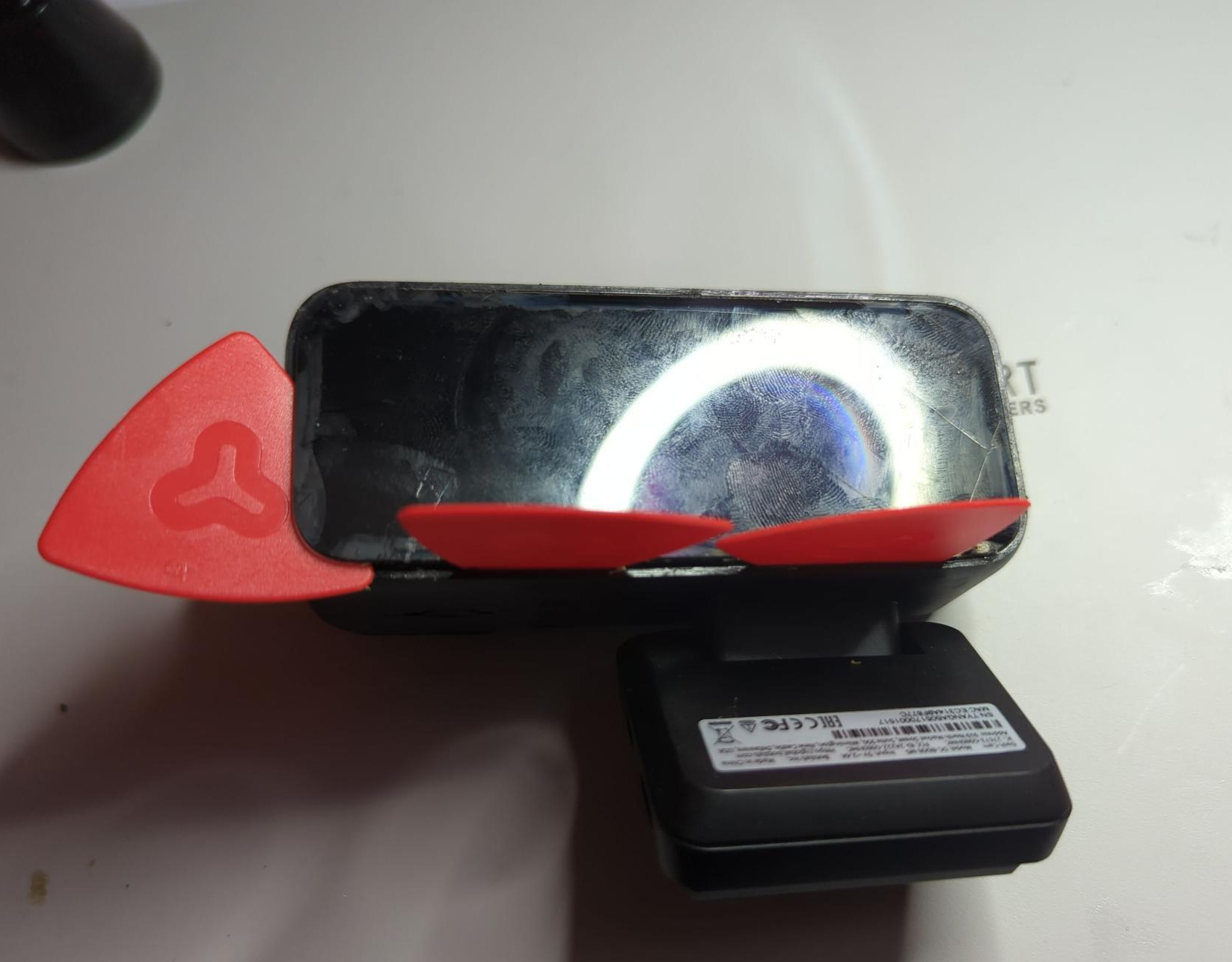
To loosen the remaining adhesive, we used a heat gun which allowed us to lift up the rest of the screen. Thankfully, the overhead light hides the few cracks in the screen caused by our prying.
Once the screen was removed, we found that the board was shielded by some plastic, which required a little bit of work to remove. These screws weren’t meant to be removed, because unfortunately we do not yet have a Right to Repair. In order to loosen them, without threading the head of the screw, we applied heat to the area, causing the plastic to expand, and allowing a large enough gap to form to allow the screws to be removed without much fuss.
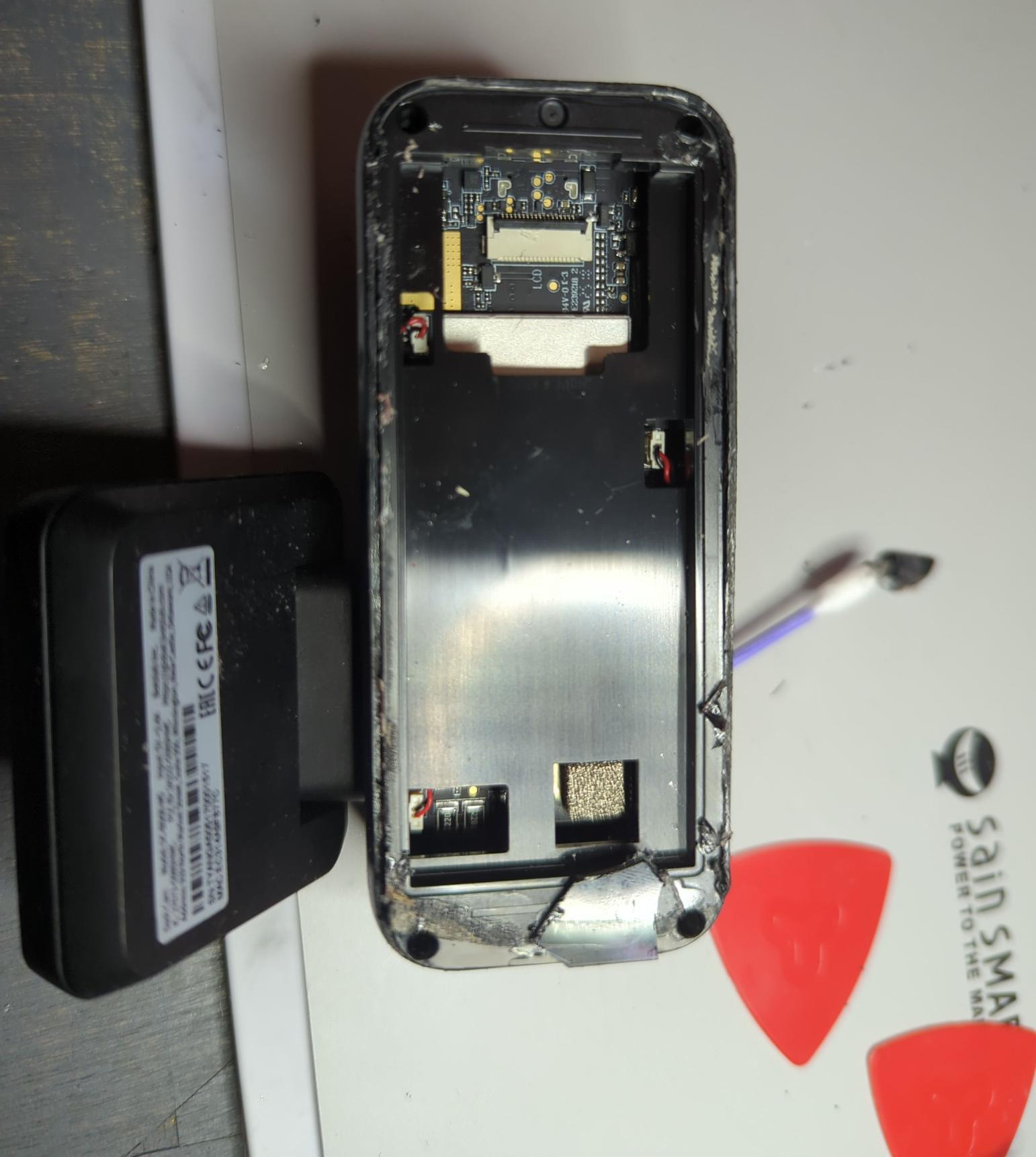
With that plastic gone, we were able to spot a set of pads that looked like UART; with little difficulty, we connected our probes.
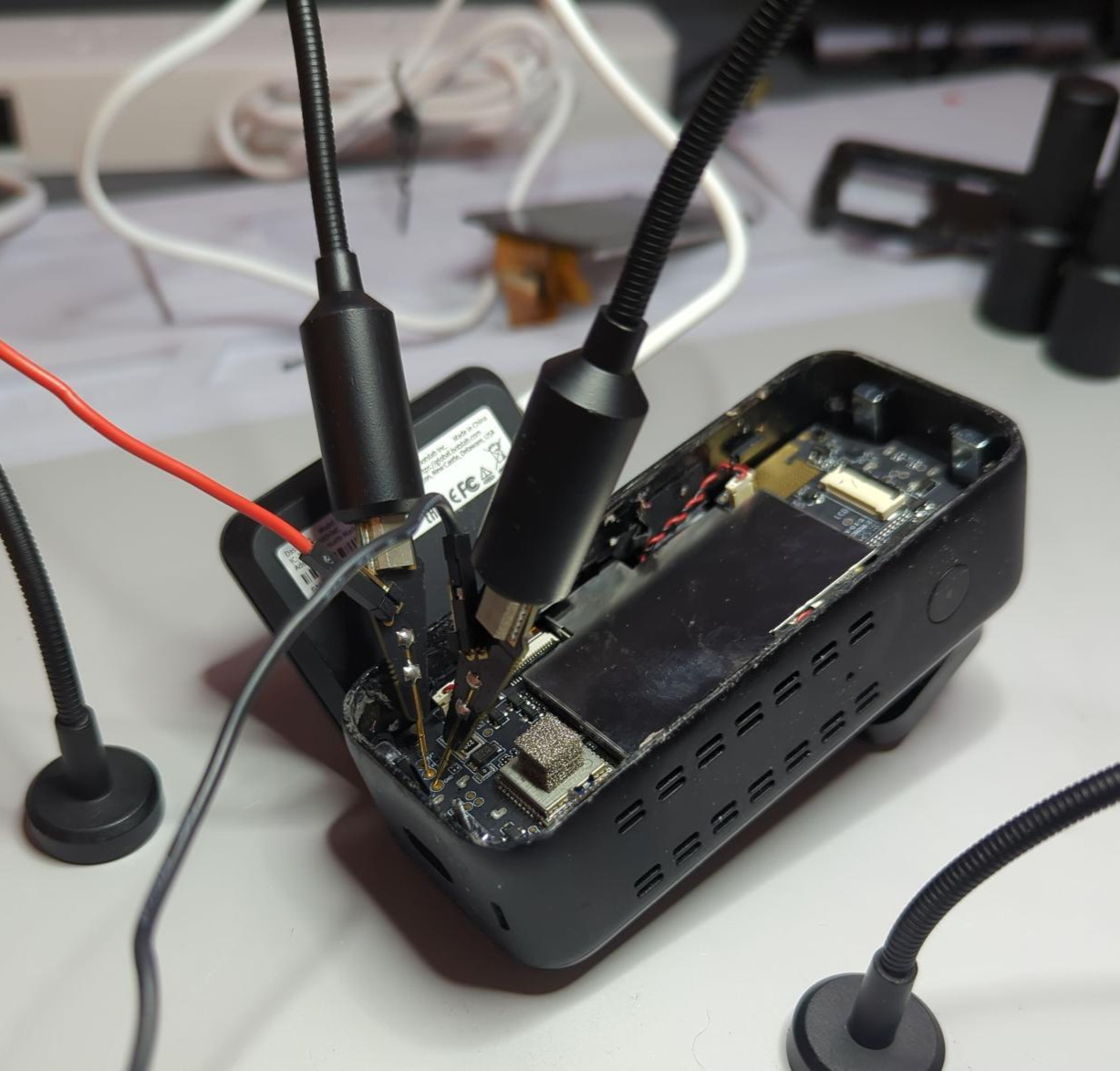
Once powered on we were greeted with a pleasant surprise: verbose UART logs!
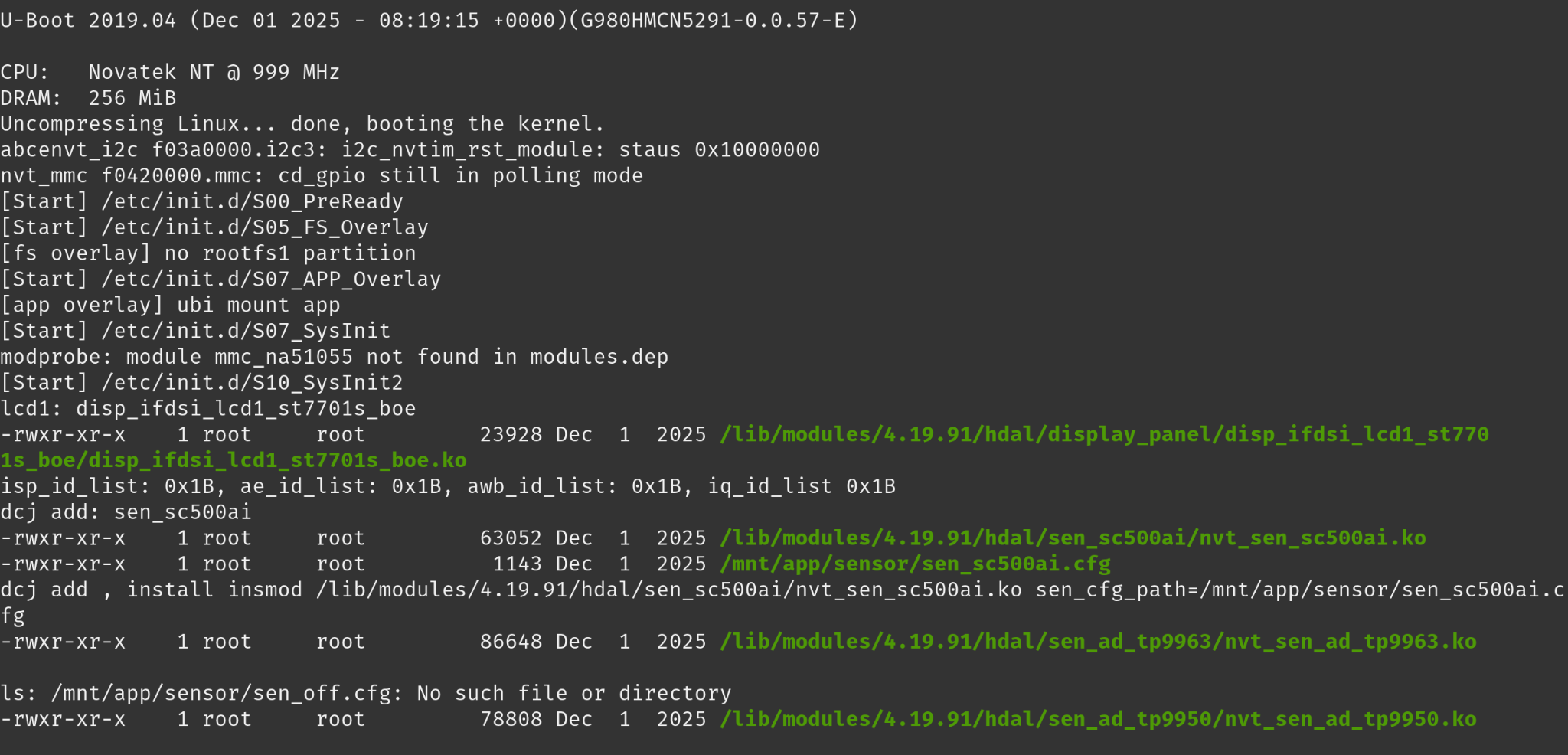
Sure enough, we dropped right into a root user account on the device and were able to begin enumerating the filesystem and device.
By analyzing the UART logs, we were able to glean quite a lot of valuable information; we were working with U-Boot, a Novatek NT98529 chip, and a full Linux operating system. We hadn’t heard of Novatek before, so we decided to do a little research.
While searching for Novatek, we stumbled upon the quite lively forum, DashCamTalk—where the internet’s dash cam connoisseurs congregate. Their discussions helped to confirm that Novatek chips are frequently used in a variety of dash cams on the market.
Based on the review of the main application binary, the data seen within UART and the Linux environment—and some previous research performed by Talos Intelligence—we believe that the firmware for the Botslab dash cam is likely supplied by Novatek as a “white label” product, meaning that the firmware is sold to a wide range of dash camera manufacturers with little branding modifications. Unfortunately for us, very little information can be found online regarding the SDK, firmware, and exactly which brands use the Novatek line of chips.
What does this mean for our research?
It’s likely that the firmware on the Botslab dash cams is deployed across countless other brands that use the Novatek chipset, with possibly some small alterations. Therefore, any vulnerabilities found on Botslab likely apply to an unknown number of other cameras. Put simply, the scope of the impact is dramatically increased for any vulnerability we find.
Firmware Acquisition
There are several approaches one can take when retrieving the firmware from an IoT device; such as removing the flash chip and dumping it using a flash reader, and reading it out over a debug protocol if that is supported.
Luckily for us, we had a far easier solution. Our device was out of date by a few versions and would require a firmware update. This situation is perfect because oftentimes we can capture the outbound request, copy the URL for ourselves, and pull down a copy to analyze.
Sure enough, while monitoring the network traffic from the phone after initiating the update, we were able to capture the following request.
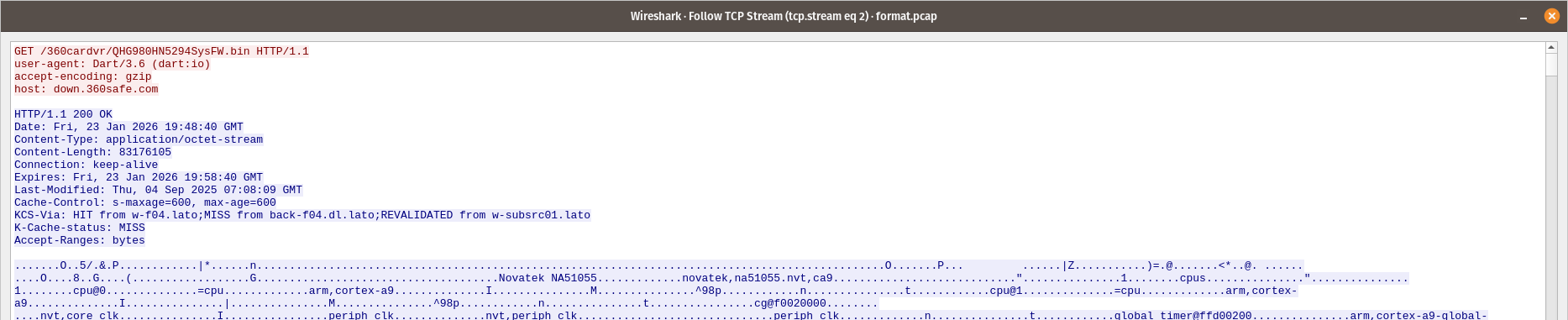
Here we see the request to download the latest firmware image to the phone: all completed over HTTP.
Rather than navigate the complexities of a chip-off, we were able to simply pull down a copy for ourselves. With the image on our local file system, we ran binwalk -e on it to extract the data from it.
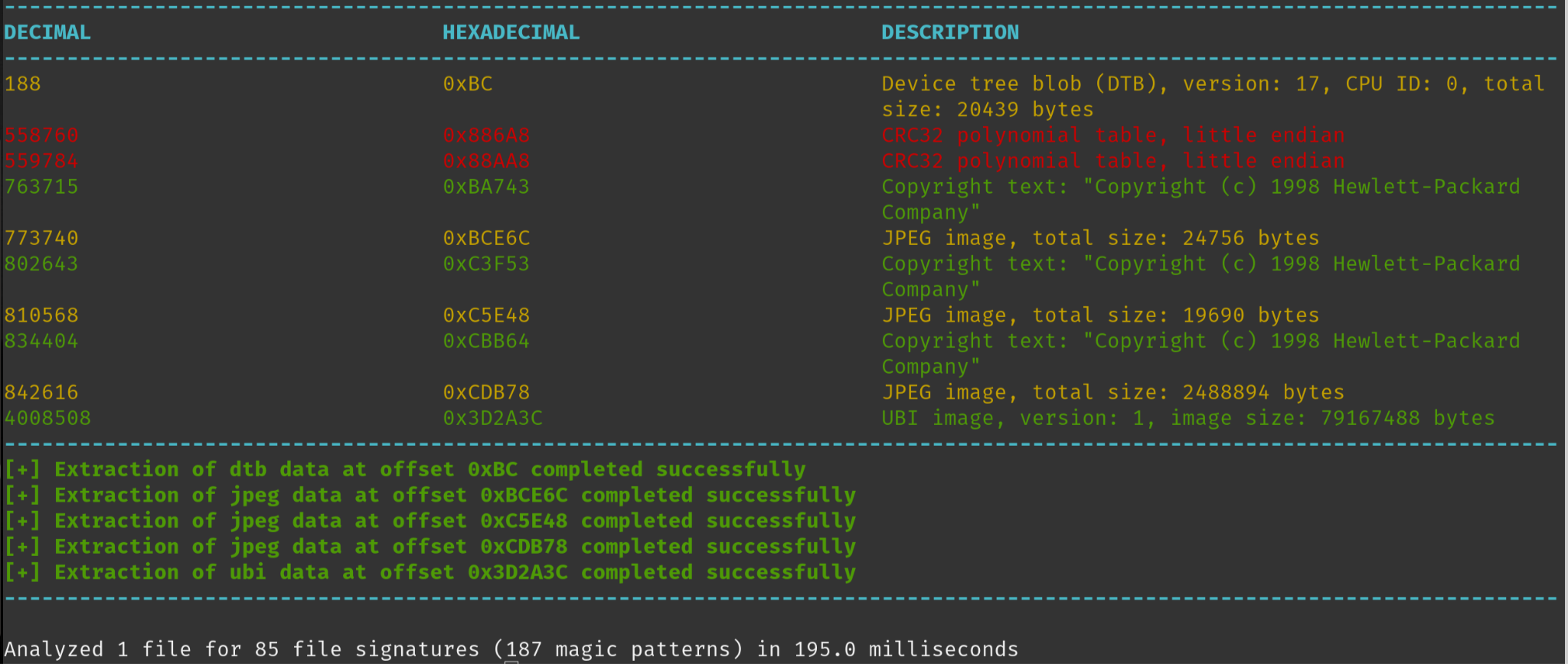
Through our earlier analysis of the device’s filesystem and its running processes, we determined that our primary focus for reverse engineering would be the cardv binary, which facilitated all of its functionality.
Both the image and the cardv binary were enormous in size. The binary came in at a whopping 17MB; for perspective, an entire firmware image is generally this size, and it poses a serious challenge for reverse engineering. IoT device binaries are generally optimized in every way possible to ensure a high degree of reliability, efficiency, and to reduce space on the flash image—cardv lacked any of those qualities.
/usr/bin/cardv: ELF 32-bit LSB executable, ARM, EABI5 version 1 (SYSV), dynamically linked, interpreter /lib/ld-uClibc.so.0, with debug_info, not stripped
We’d later find that the binary contained oodles of leftover and dead code from other applications. This code seemed to be either spliced in for some limited functionality or so as to deploy the binary on a wholly different device,the code could also have been operational at some point but is no longer used. Some of our favourite highlights include: an entire RTSP server, two HTTP servers, and roughly nine different functions related to setting the access point’s password (only one of which was functional from what we could discern through testing).
Reversing Engineering
With our binary in hand, we fired up Ghidra, loaded cardv in, and after much patience, the auto analysis task was completed within Ghidra and the fun could begin.
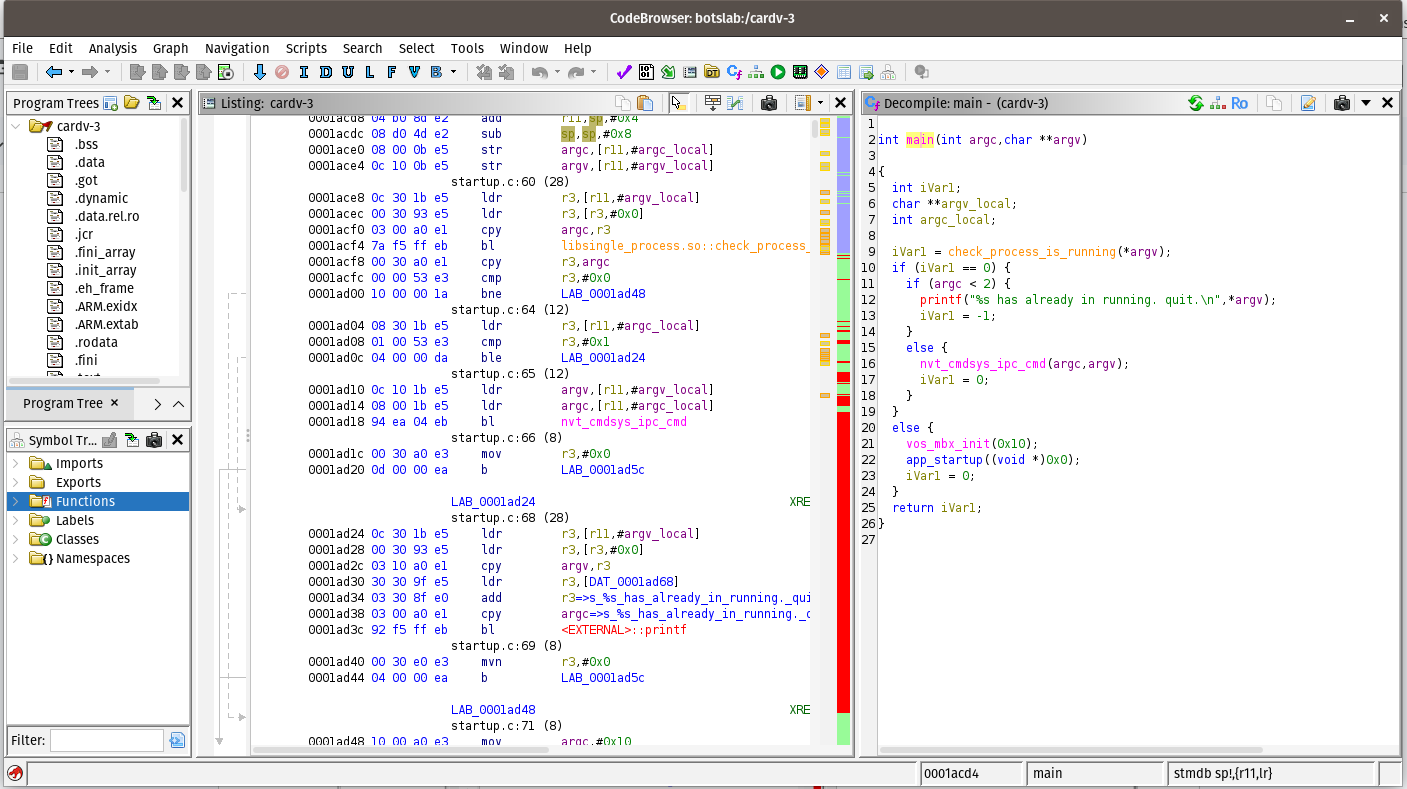
To make sense of this enormous binary, and to focus our attention on the most pertinent components, it was vital to have a starting point. The most logical path forward was to turn our attention back to the Wireshark and UART logs that we had previously captured in order to interpret the data flow between mobile application and dash camera.
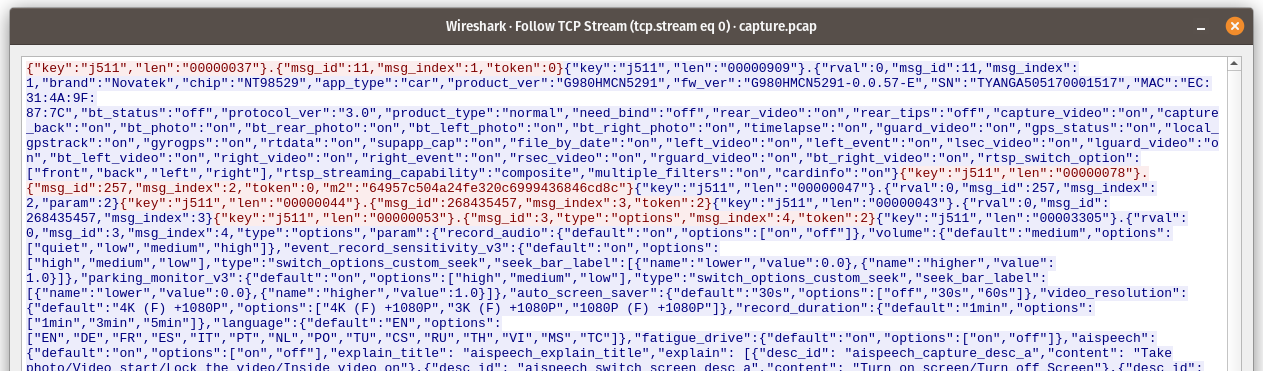
In the following image, we can see the first message sent from the mobile application, indicated in red. This message returns some basic configuration information about the device, including the product version, firmware version, serial number, and the status of various services.

Each message includes several key value pairs: a key (j511), a length (len) of the message, a message identifier (msg_id), a message index (msg_index), and a token or m2 hash. In the response, we can also observe an rval, or return value, which indicates whether or not the request was successful.
With a basic understanding of the communication structure, we could focus our efforts on understanding its functionality from the perspective of the cardv binary. The first task was to determine how exactly the camera would authenticate the mobile phone on its first connection.
By searching for the strings seen in the requests, and analyzing each of the returned functions, I was able to determine that this was likely being handled by the grouping of functions starting with the name UIAppCmd. The first of which in this flow was UIAppCmdSocket_DataProcess.
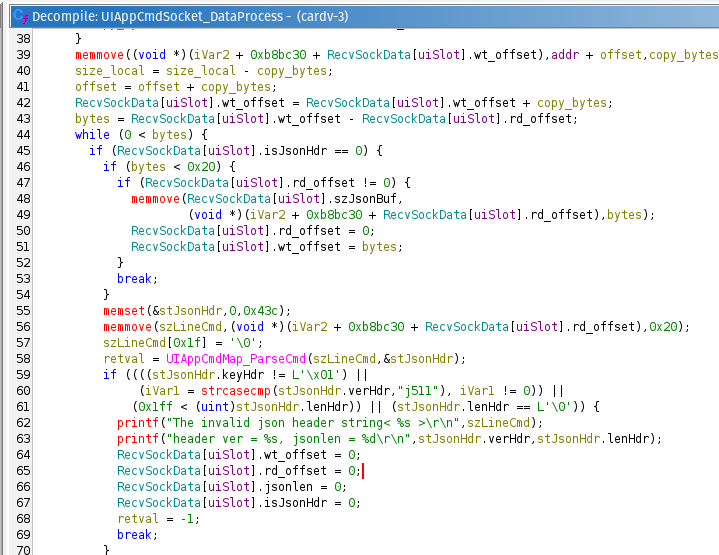
This function handles all inbound data over port 7878. When a request is received, UIAppCmdSocket_DataProcess is called, parsing the 32-byte header, {“key”:”j511”, “len”: “000…”}. The full message is then handed off to UIAppCmdMap_ParseCmd, which copies the m2 field into ReqInfo.sign and ensures that the data types within the message align with what is expected.
The UIAppCmdSocket_DataProcess function then checks that the received version is j511, and then determines the length of bytes.
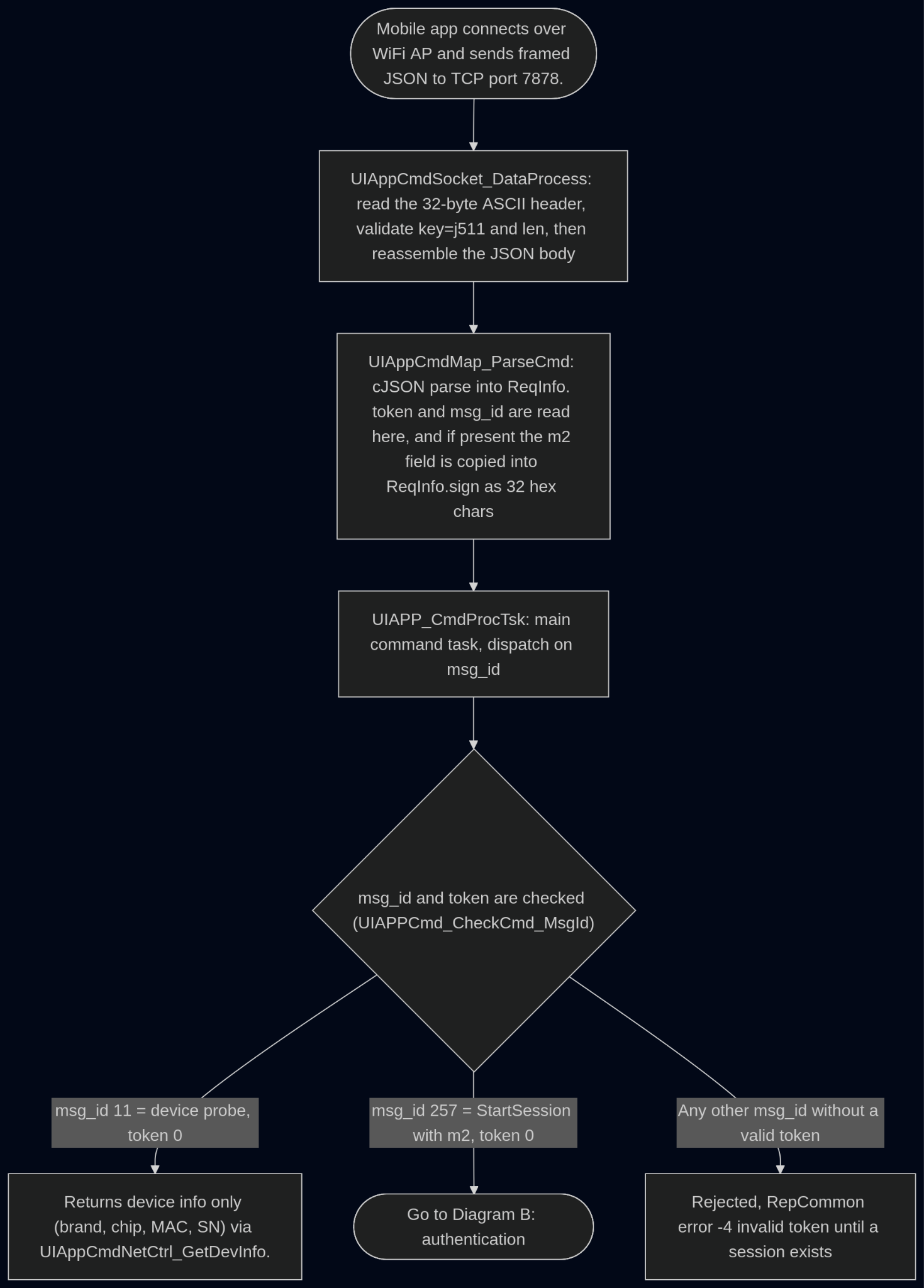
UIApp_CmdProcTsk makes a decision based on the msg_id value; if the msg_id of the inbound message is 11, then it bypasses the authentication check, returning the configuration data. If the msg_id is 257 and the header contains an m2 hash it proceeds through the next steps. Any other msg_id value which lacks authentication returns rval -4, rejecting it.
We can see this process illustrated by the following diagram:
The message then hits UIAPPCmd_ProcCmd_StartSession to validate the incoming m2 hash with UINet_CheckConnectAuthSign. This function checks the flash memory for the hash to determine if it has been seen before.
If the hash has been seen before, the command executes. However, if the hash has not been seen before, then UIAppCmdNetCtrl_WaitSignature is called, creating a user prompt that is presented on the screen. This prompt requests that the user confirm the pairing of the camera to a new phone. If accepted, the m2 hash is persisted and then associated with a token integer to authenticate the future requests.
The following diagram illustrates the rest of the flow:
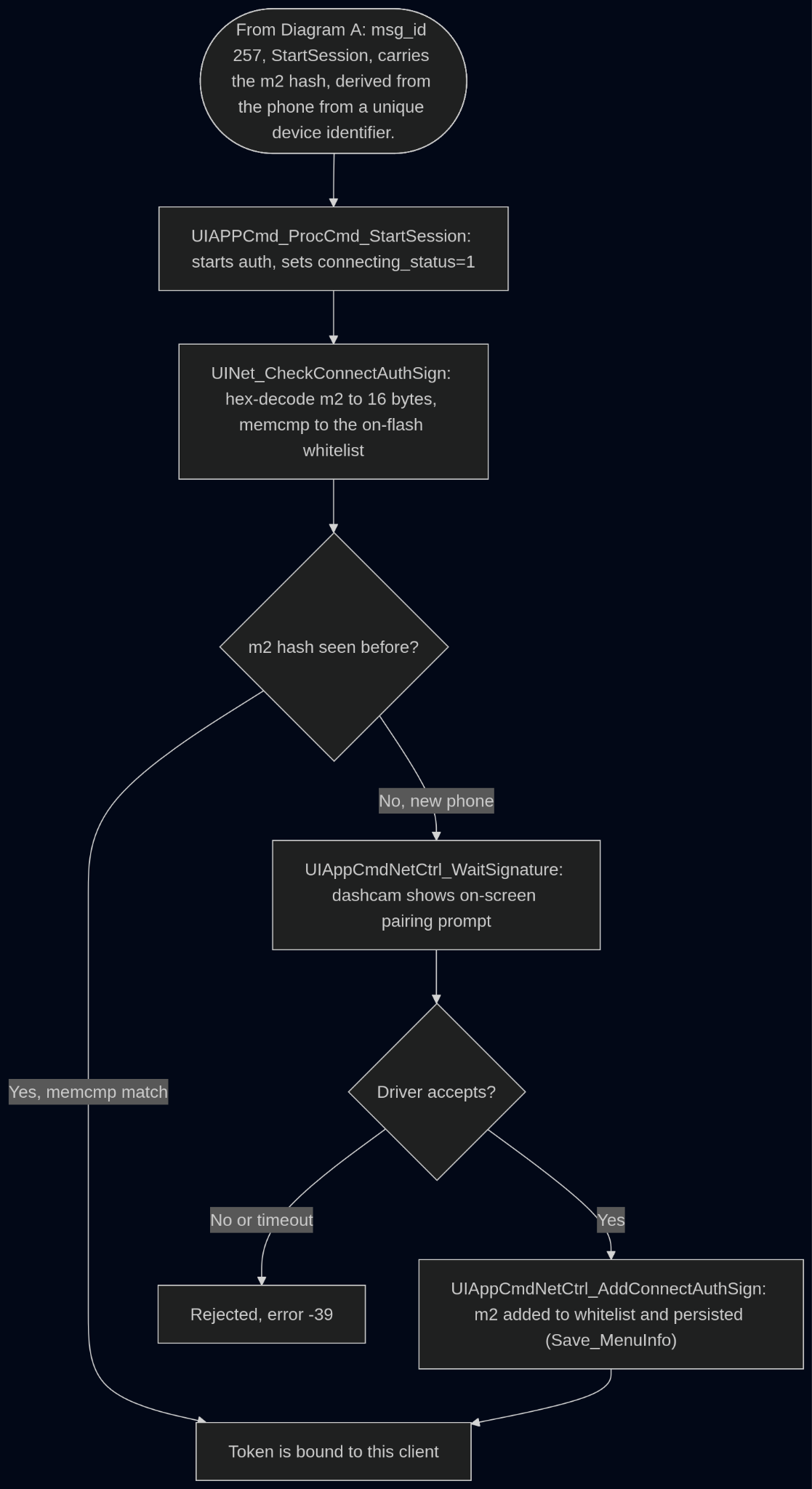
What caught our attention was the last piece of the flow: once an m2 has been persisted, all subsequent requests are authenticated with a token. That token is… a single integer (ranging from 1-11), which we’ve seen in some of the previous traffic captures. We can see that in action here, where a token is sent for msg_id 3 msd_index 5.

Thus, we can negate the requirement of a valid m2 hash if we can guess the token of an active session. If another session is active when we are connected, our client will take precedence over the legitimate session and “ride” the token, allowing us to execute privileged commands and effectively bypass the authentication flow.
With a little bit of Python we can see this in action. In this video, our mobile phone and the Raspberry Pi the script is run from are both connected to the access point. We first send a request with the token value 2, with a msg_id and msg_index that requires authentication. This fails since 2 is not associated with the current session.
Then, the script re-sends the message, this time with the token value set to 1, which is associated with the driver’s m2 hash, authenticating our request and allowing us to retrieve additional information from the device.
The likelihood of the driver having an active session is not insignificant when a car is in movement. Most people do not turn off their phone’s Wi-Fi, and as a result, it is constantly looking for networks with which it has been associated with before, since the dash cam is on and advertising, the phone will pair with its network automatically. The remaining requirement is that the mobile application is open, which would start the authentication in the background.
However, we are still left with a fairly major gate to exploiting this vulnerability; to exploit this, we must be connected to the device’s Wi-Fi network.
Bluetooth Low Energy (BLE)
Those who are familiar with our previous work (Hacking Furbo and Hacking Meatmeet) may remember our interest in Bluetooth Low Energy (BLE) and the vulnerabilities that it can yield.
Using the same technique outlined in the Hacking Furbo blog series, we enabled the Bluetooth HCI Snoop Log in Developer settings on our jailbroken Android phone.

Then, we went through the normal flow of connecting to the dash camera over BLE; this connection permitted only minor access. It allowed us to view the current device settings, within the device’s settings page, this included the Wi-Fi password of the device’s access pont—very interesting!
Once that was completed, we connected to the phone over adb and pulled the log files by running the following command:
adb bugreport output
The btsnoop_hci.log file contained within the export could then be parsed with Tshark, the output of which can be seen in the following screenshot:
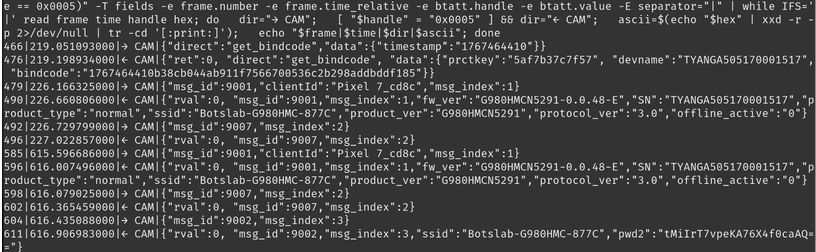
We can see several interesting pieces of information here including the firmware version (fw_ver), SSID, the serial number (SN), and some sort of encoded value (pwd2). At first glance, this pwd2 value looks like base64 encoded data, however decoding it returned garbled text—it was encrypted.
Notably, none of this information was sent over an authenticated or encrypted BLE connection. But what can we do with it?
Let’s go back for a minute to what happens when you first receive a Botslab dash camera. After plugging in the device, you must connect to it over BLE with the mobile application, and it is associated with your account. The default device Wi-Fi password is an 8 character, seemingly random, string of capital letters and numbers.
Seen here is the default Wi-Fi config taken from a device:
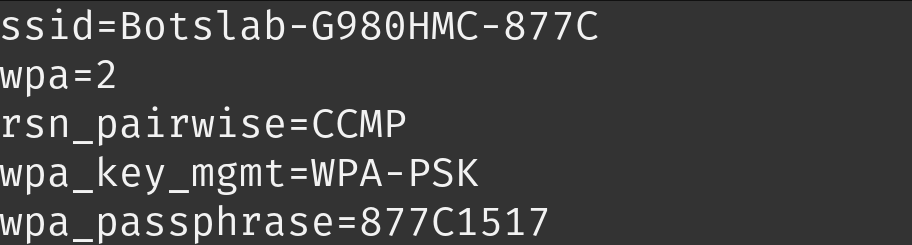
But how is this default Wi-Fi password determined? Well, if you look closely the first 4 bytes match the last 4 bytes of the SSID.
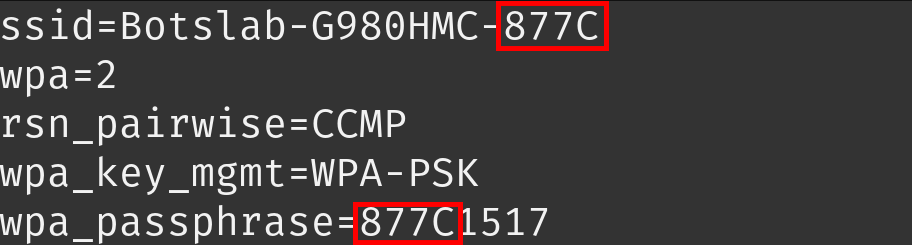
That gives us half of the password, easy enough! We could simply guess the rest, but it gets better! The remaining characters are derived from the device’s Serial Number (SN), which of course is disclosed by the device when we connect to it over BLE. If the default password has been left on the device, we can simply walk up, connect to the device over BLE, grab the SN and SSID values, and successfully connect to the access point! Not too bad.
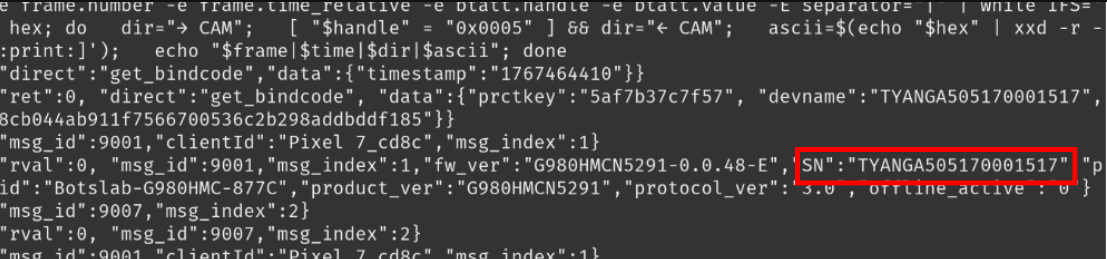
But we’re not happy stopping there. Some owners may change the default password, preventing us from gaining access. Well, what about that pwd2 value that is returned over BLE?
Returning to the binary in Ghidra, we can see that the FastConnect_GetApInfoW function handles this; it retrieves the current SSID and passphrase. Before returning the passphrase though, it processes it with the EncryptPassword function.
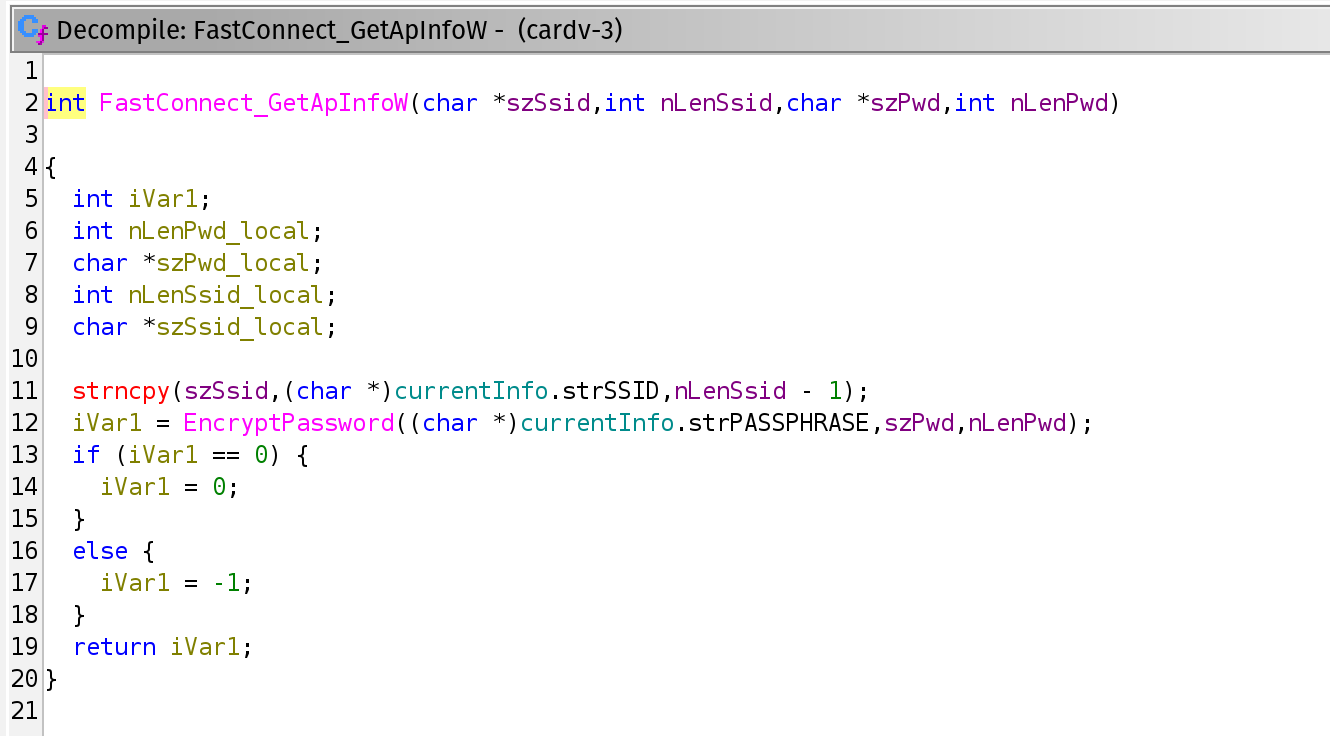
Sure enough, within the EncryptPassword function, we find two things: a hardcoded Initialization Vector (IV) and secret key!
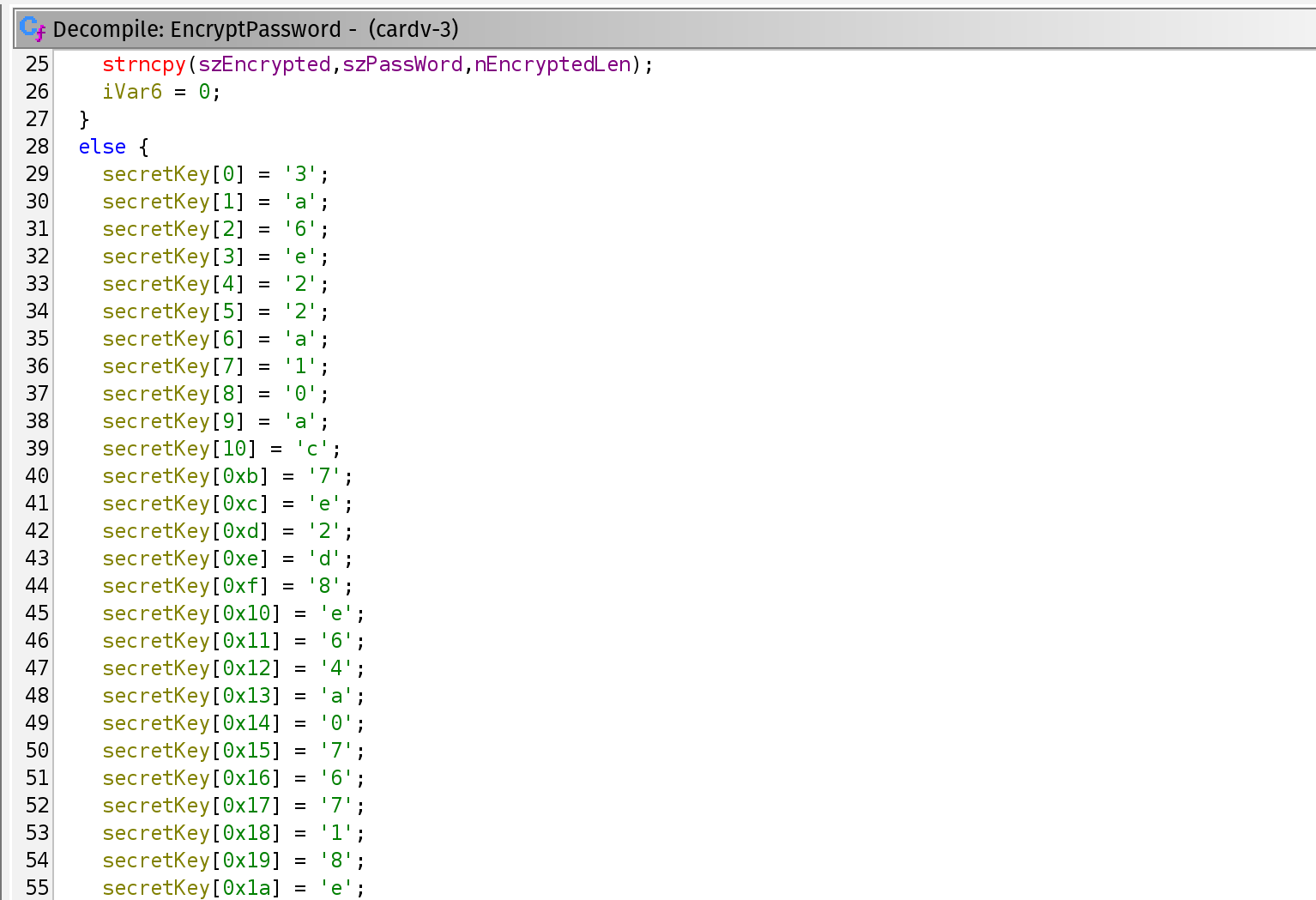
With these values, we can construct a decryption script that will decrypt any password returned over BLE. In the following screenshot, we can see that decryption in action:

While analyzing this flow, we stumbled upon an answer to our initial question:
“Could we, as an unauthenticated attacker, disrupt the video communications in a temporary or permanent way?”
Before describing it, let’s take a minute to describe the basics of JSON. JSON objects are lists of named entries — each value has a key. Arrays are lists of entries without keys. Here we can see an array, or a collection of objects, and the corresponding objects.
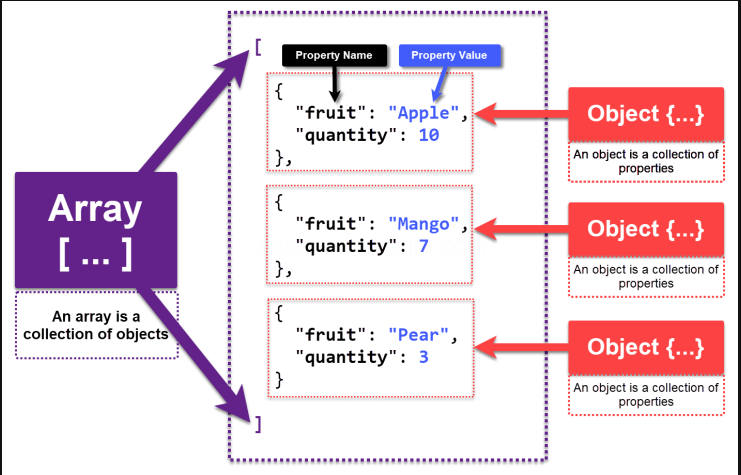
However, Arrays can also take a simpler form such as:
[ 123, 456, 789]
Now here's how JSON parsing has been implemented in the FastConnectCtrl_ParseCmd function which processes inbound messages over BLE and port 7878.
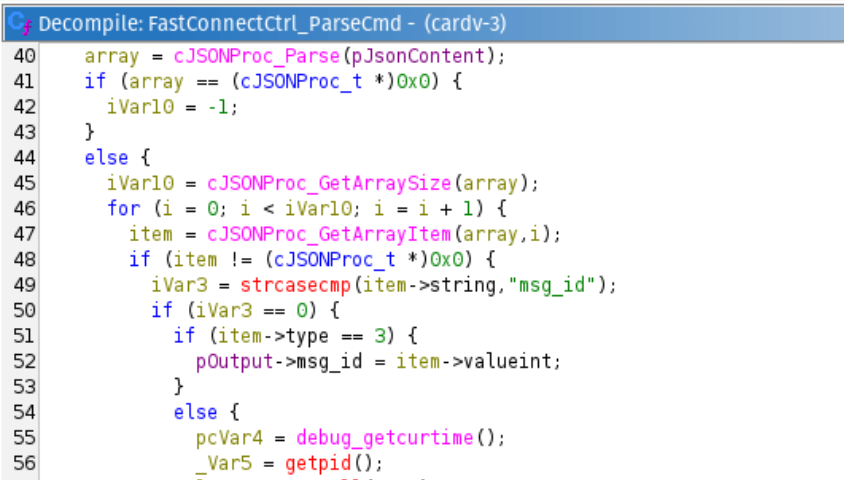
The BLE command parser takes the JSON body, counts the entries, and processes each one in turn. It never validates that the received value is an object, so an array is accepted and processed as an object. For each entry it reads the entry's key and compares it against known names such as msg_id.
But since it only assigns a key to entries inside an object and entries inside an array have none, that pointer is NULL. The comparison dereferences it, reading address zero, and the process crashes. We can achieve this by simply sending:
[ 1, 2, 3 ]
This gives an attacker 20-30 seconds of downtime per run, allowing them to disrupt the owner’s camera until the device recovers. In some runs we observed that the binary crashed, but the device did not restart, requiring a manual reboot to return it to an operational state.
The Attack Chain
To sum up the work so far, we have constructed the following attack chain:
- An attacker within Bluetooth range can leak the encrypted password (or simply determine its value if it is the default).
- They can then decrypt the password and connect to the access point.
- Once connected, they can brute force a session token integer to execute privileged commands.
- With this access we can change settings but more importantly, upgrade the firmware and achieve RCE!
Disclosure
In March of this year, we reached out to the security contact email listed on Botslab’s website, informing them of our desire to responsibly disclose our findings. Several weeks passed without a response, so we followed up with them again to no avail. Without any response from Botslab, we tried our luck at contacting Novatek as well. By the end of June, neither organization had responded to us. It was at this point that we reached out to the Carnegie Mellon CERT team, to receive assistance in responsibly disclosing our findings. Despite our combined efforts, we only received one response from Botslab by mid-September. No further communications, or indications that the vulnerabilities would be remediated, were received. As of this publishing, it has been approximately 6 months since our initial contact, and unfortunately, these vulnerabilities have not been addressed.
What does this mean for owners of these cameras? Well, it’s likely that they are still vulnerable to the exploits we have described. It is also possible that other brands of dash cameras are affected. By Google Dorking the DashCamTalk website, supplying NT98529 as a search operator, we found that several other brands use this Novatek SoC according to users of that platform.
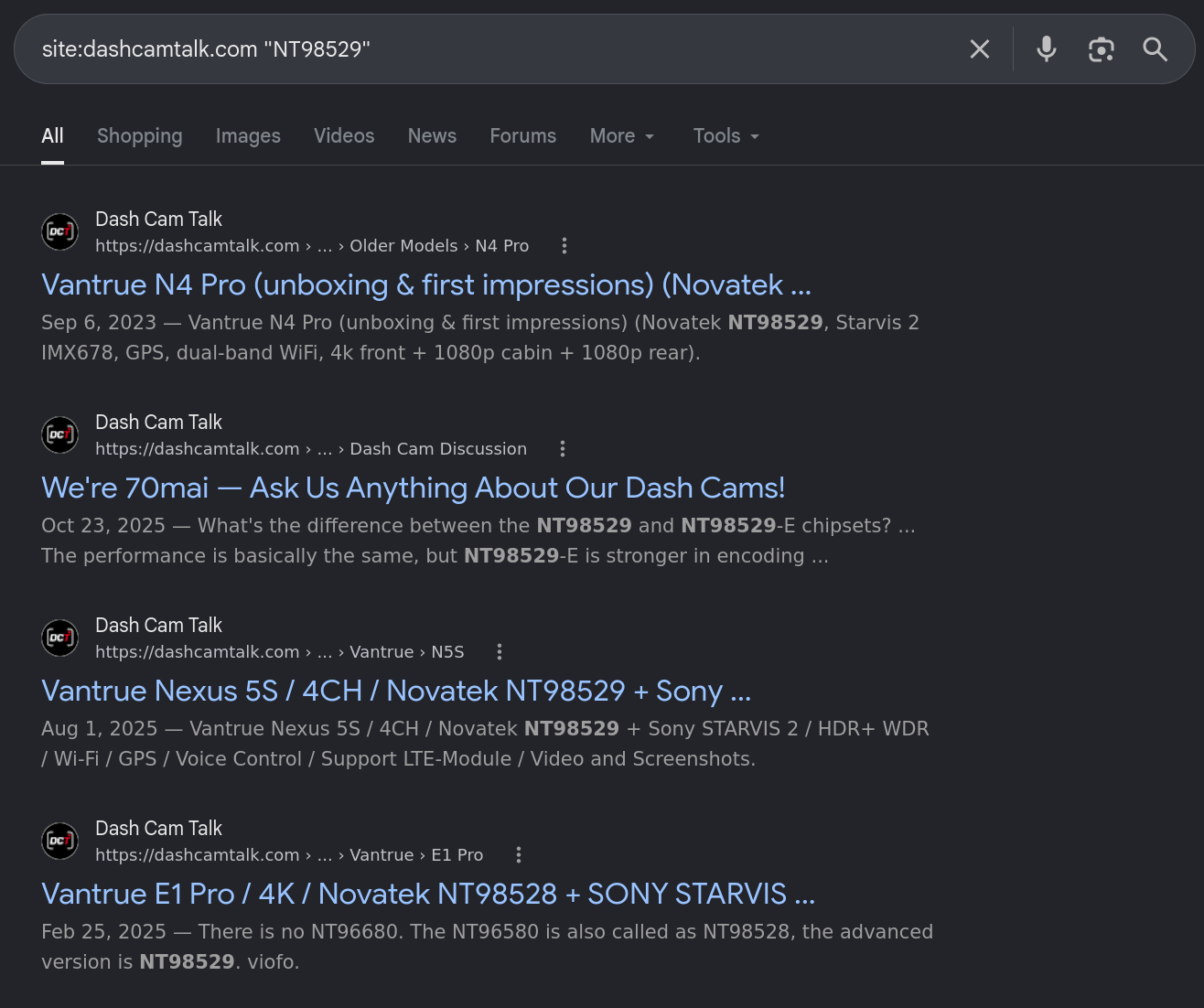
Note: This does not necessarily mean they are using the exact same firmware as Botslab, however it is likely quite similar, and could contain the same vulnerabilities.
We have pulled down the APKs of these brands and retrieved the firmware for most of the devices. Based on the firmware, it was determined that the following dash cameras contain the same cardv binary:
- Vantrue E3
- Vantrue N5S
- VIOFO A119 Mini
- VIOFO A329S
- VIOFO A229 Pro
As we do not have the live devices in hand, we cannot confirm with absolute certainty that these devices are implemented in the same way as the Botslab dash camera. 70mai, another dash camera brand, may also be using the same firmware—users of DashCamTalk indicated that the A810 and M800 are distributed with the Novatek NT98529 SoC—however we were unable to obtain a copy to confirm.
Given the impact of our findings, we have withheld some of the technical information regarding the final exploit which gained us access to a telnet shell on the device and do not intend to share the full proof-of-concept scripts to prevent the exploitation of the described vulnerabilities by malicious actors.
We remain open to working with the team at Botslab or Novatek to address the vulnerabilities identified and thank the Carnegie Mellon CERT for their assistance in responsibly disclosing these vulnerabilities.
CISA Disclosure Page: https://www.cisa.gov/news-events/ics-advisories/icsa-26-267-01
CVE-2026-84399
CVE-2026-82566
CVE-2026-85496
CVE-2026-77967
CVE-2026-88761
CVE-2026-88956
CVE-2026-82716
CVE-2026-84403
CVE-2026-75558
CVE-2026-81630
CVE-2026-87118
CVE-2026-82708
CVE-2026-79959
CVE-2026-82585