How to Track Your Security Program Over Time
Discover how to measure security program improvement over time using vulnerability tracking, remediation SLAs, penetration testing history, and retesting. Learn how to turn individual pentests into a repeatable process for managing risk, validating fixes, and demonstrating progress to stakeholders.
Most teams think of a penetration test as a report. Testing happens, vulnerabilities are documented, the report is delivered, and the project ends. But that's where the work really begins. Vulnerabilities need to be remediated. Fixes need to be validated. Remediation deadlines need to be monitored. And when you test again, you need to compare the results with previous assessments.
The Software Secured Portal gives you a continuous record of that process. Instead of managing security progress across reports, spreadsheets, email threads, and disconnected tools, you can track vulnerabilities, remediation, SLAs, retesting, testing history, and project activity from one place.
Get a Clear View of Your Current Security Posture
Before you can measure improvement, you need to know what needs attention now.
The Portal Dashboard
The Portal Dashboard provides a centralized view of security activity across your projects. From the dashboard, you can:
- View and manage vulnerabilities across multiple projects
- Triage vulnerabilities using Notes and Labels
- Assign ownership and document remediation decisions
- Monitor SLA status and remediation deadlines
The Project Timeline
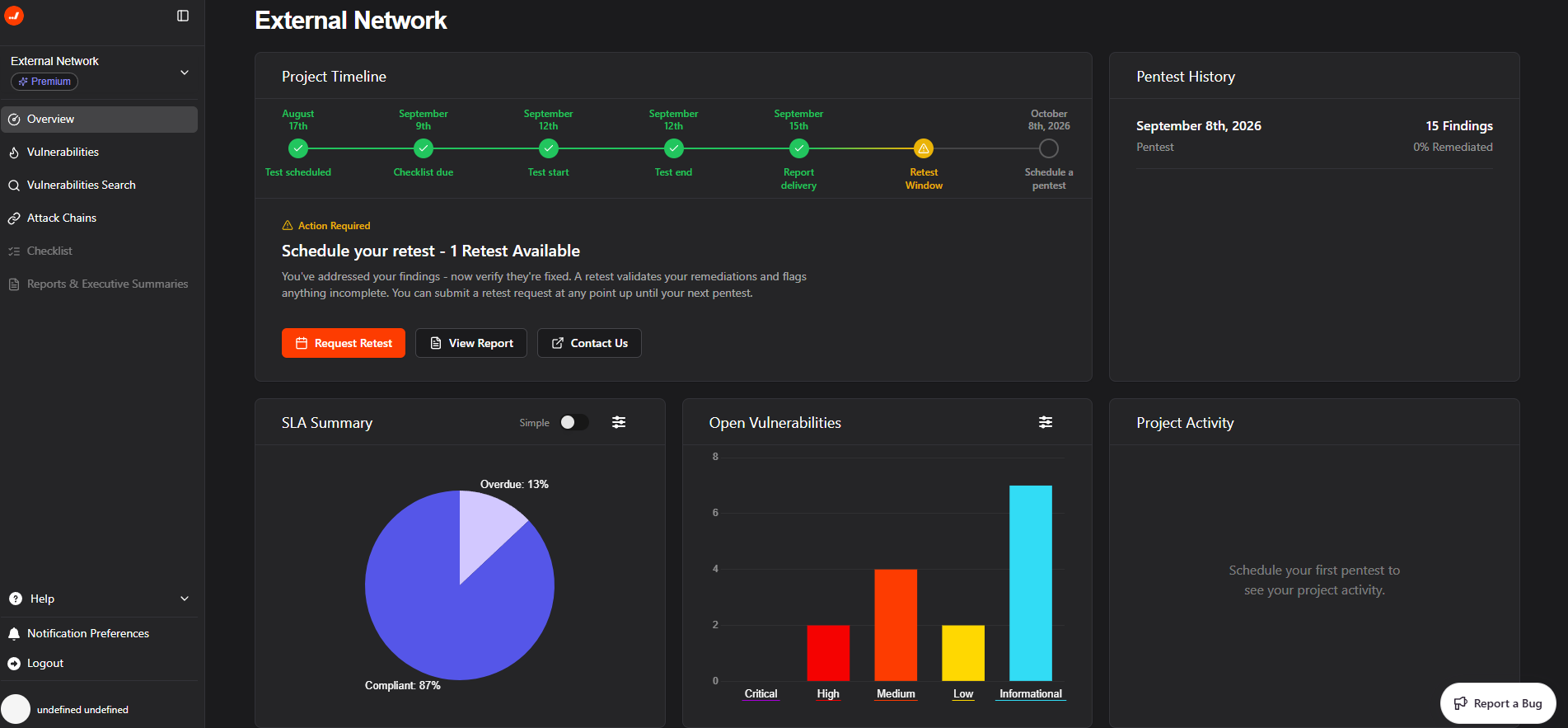
The Overview page shows where a project is in its testing and remediation lifecycle.
The timeline includes seven stages:
- Scheduling: Confirm the assessment and prepare the environment for testing
- Pentest Checklist: Complete the pre-test checklist, confirm scope and points of contact
- Active Testing: Testing is underway, and Software Secured's team is handling the assessment. Stay available via Slack or email in case testers need to reach you, but there's nothing your team needs to monitor actively.
- Testing End: Our team conducts QA and calibrates vulnerability scoring. Nothing required from your side at this stage.
- Report Delivery: Access the completed pentest report; import into your ticketing system.
- Retest Window: Initiate retesting after vulnerabilities have been addressed
- Your Next Pentest: Plan the next testing cycle
When you initiate a retest, the timeline updates to show the retest process as well, from scheduling through updated report delivery. The number of retest rounds available depends on your service: black box network tests include 1 round of retesting, all other services include 3 rounds to give your team space to work through remediation, and PTaaS includes unlimited retesting rounds to support continuous validation across every testing cycle.
Open Vulnerabilities
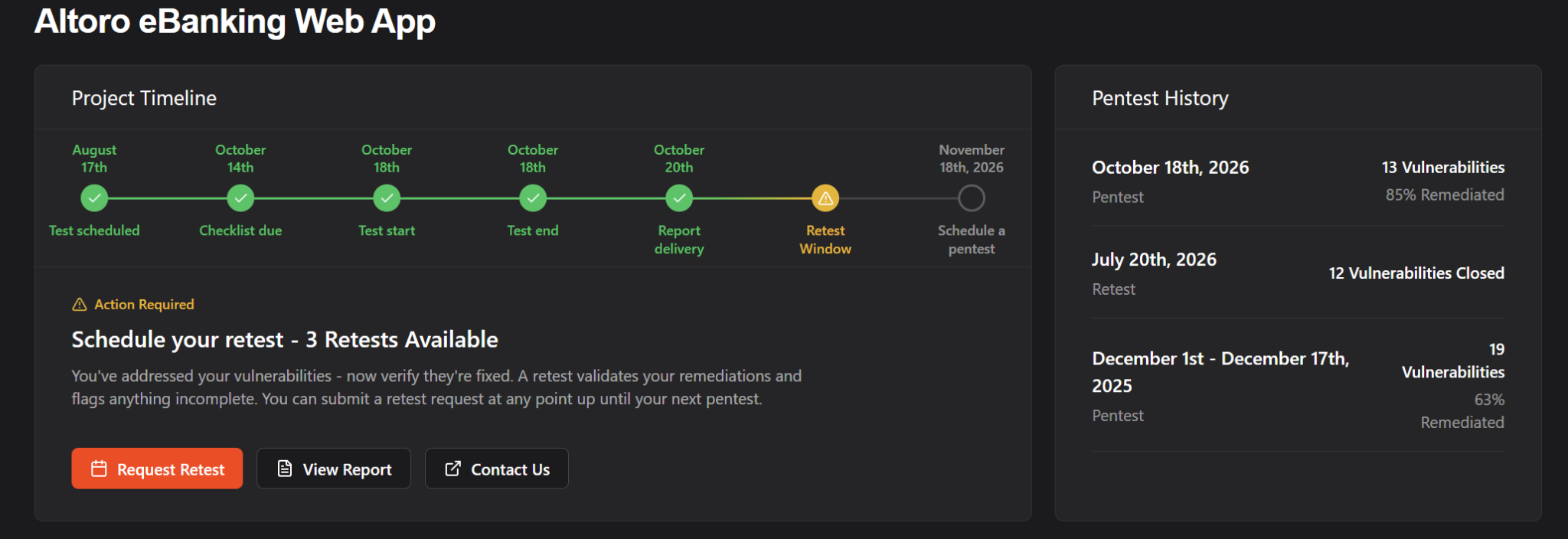
The Overview page also provides a visual breakdown of currently open vulnerabilities by severity. You can filter this view by:
- Compliance framework
- Project component
- SLA status
Track Remediation and Risk Over Time
A vulnerability count alone doesn't tell you whether your security program is improving. You also need to know how vulnerabilities are handled and whether remediation happens within the expected timeframe.
Monitor SLA Compliance
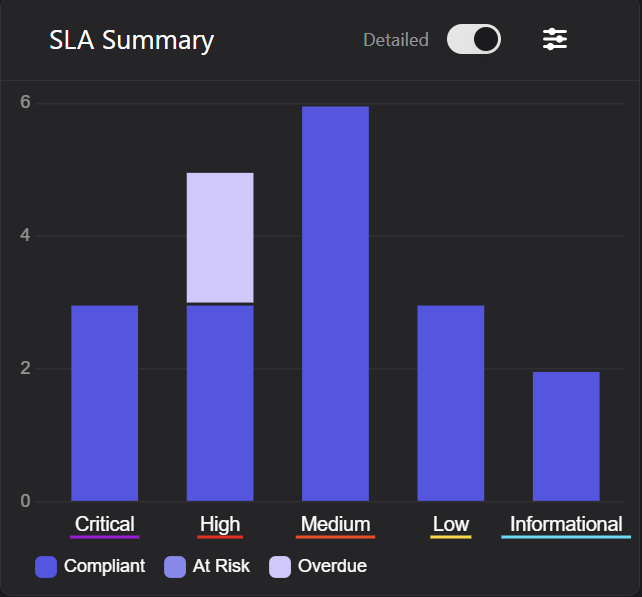
The Portal provides two views of SLA performance:
- Simple view: Total vulnerabilities by SLA status
- Detailed view: SLA status broken down by severity
Software Secured's default remediation windows are:
Each vulnerability has one of three SLA statuses:
- Compliant: The vulnerability is within its remediation window or has been resolved
- At Risk: The remediation deadline is approaching
- Overdue: The remediation deadline has passed
Organizations with their own security policies can customize these timeframes directly in the Portal through the SLA Settings modal.
Keep a Complete Vulnerability History
The Vulnerabilities tab gives you a longitudinal view of every vulnerability.
For each vulnerability, you can see:
- Status: Open, Remediated, Accepted, or Reopened
- Severity
- SLA status
- Date identified
- Last updated
- Affected compliance frameworks
- Labels
Labels provide additional context, such as:
- Release version or sprint
- Development team or business unit
- Priority or remediation owner
Each project supports up to 50 labels, allowing teams to organize vulnerabilities around their own development and security processes.
Document Risk Decisions
Not every vulnerability will be remediated immediately. If your team accepts a vulnerability, the Portal requires a note and timestamp to document the decision. Once accepted, the SLA no longer applies, but the decision remains part of the vulnerability's record and is noted in the Pentest Executive Summary, supporting your sales motion.
If a previously remediated or accepted vulnerability resurfaces, you can reopen it and track it through the remediation process again. From the Vulnerabilities tab, you can also book retests for specific vulnerabilities, export vulnerability data as CSV, or copy vulnerability information for use in other systems.
Know Whether Vulnerabilities Were Actually Fixed
Remediated and validated are different.
A development team can mark a vulnerability as resolved, but that doesn't necessarily confirm the underlying issue is fixed. Retesting provides additional validation that the remediation was effective.
Retest the Vulnerabilities That Matter
Through the Portal, you can initiate a retest for all vulnerabilities in a project or select a specific subset. For example, you might retest:
- All Critical and High vulnerabilities
- Vulnerabilities affecting a specific application component
- Vulnerabilities addressed in a recent release
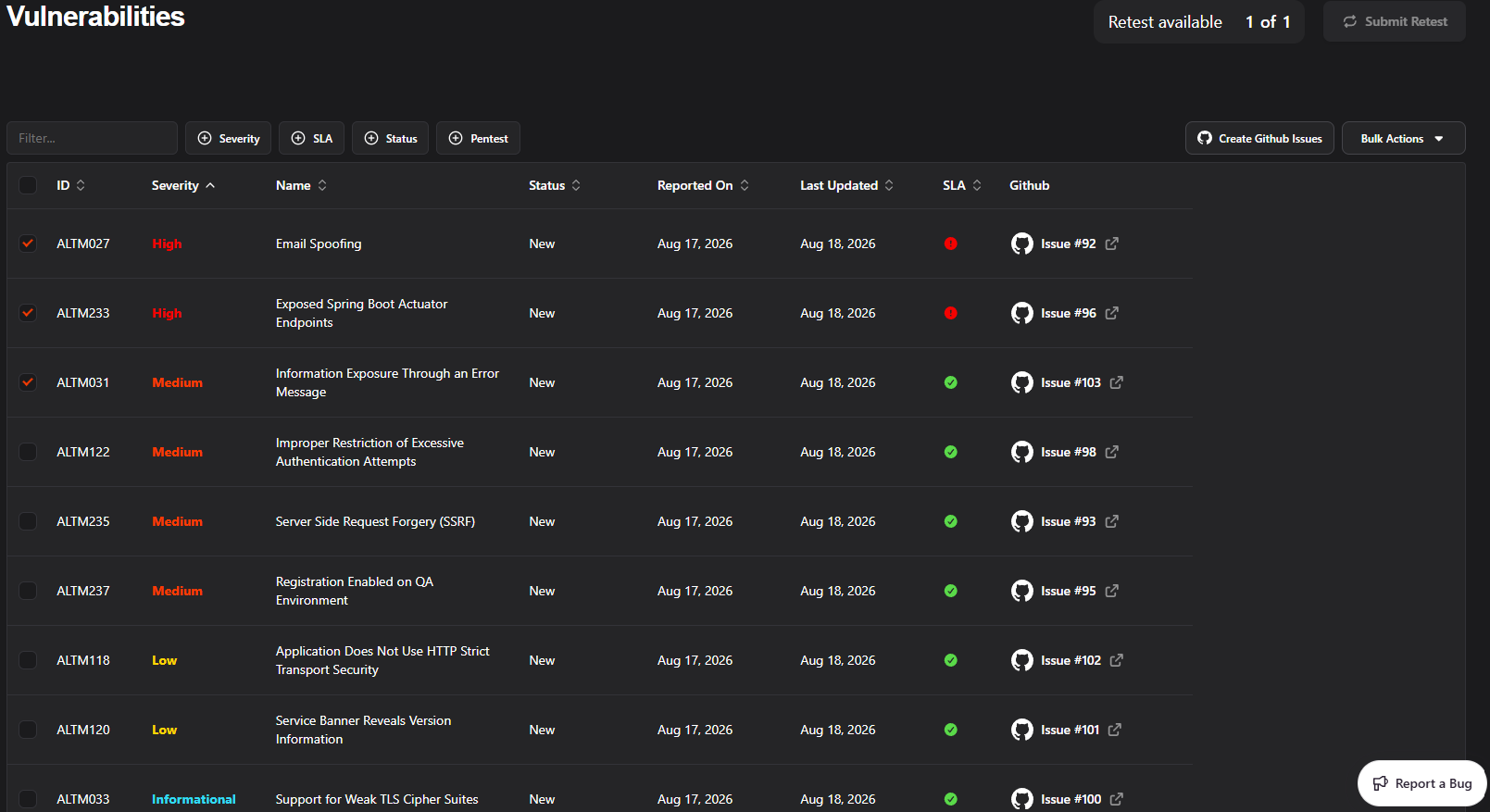
This allows you to focus retesting on the changes that matter most rather than repeating the entire assessment.
Track Retest Results
Once a retest is complete, the Portal updates vulnerability statuses and generates an updated report. Available retest rounds depend on your plan:
- Standard: 1 retest round
- Standard Plus: 3 retest rounds
- PTaaS / Premium: Unlimited retesting
A remediation record tells you that an issue has been marked as resolved. A retest gives you evidence that the fix worked.
Use Pentest History to Measure Improvement
Looking across multiple assessments lets you see whether your remediation efforts are actually improving your security posture.
Review Pentest History
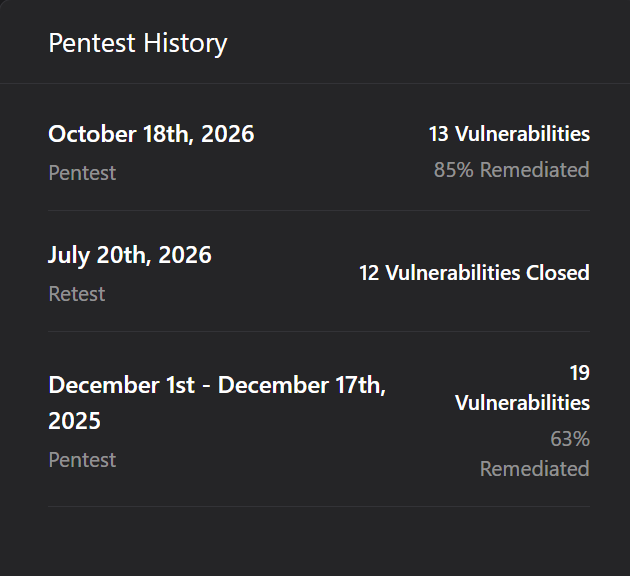
The Overview page maintains a historical list of pentests and retests associated with a project, with the most recent activity shown first. For each pentest, you can see:
- How many vulnerabilities were identified
- How many were remediated
For retests, you can see:
- How many vulnerabilities were closed
Comparing these results across testing cycles shows whether remediation efforts translate into measurable improvement.
Review Project Activity
The Project Activity section provides a chronological record of important events, including:
- Scheduling activity
- Checklist submissions
- Report deliveries
- Retest activity
This creates a historical record of what happened and when, which can help with internal reviews, team handoffs, and audit preparation.
Compare Historical Reports
The Reports & Executive Summaries tab provides access to your historical testing record. Using the test range selector, you can review a specific pentest or multiple tests across a defined date range.
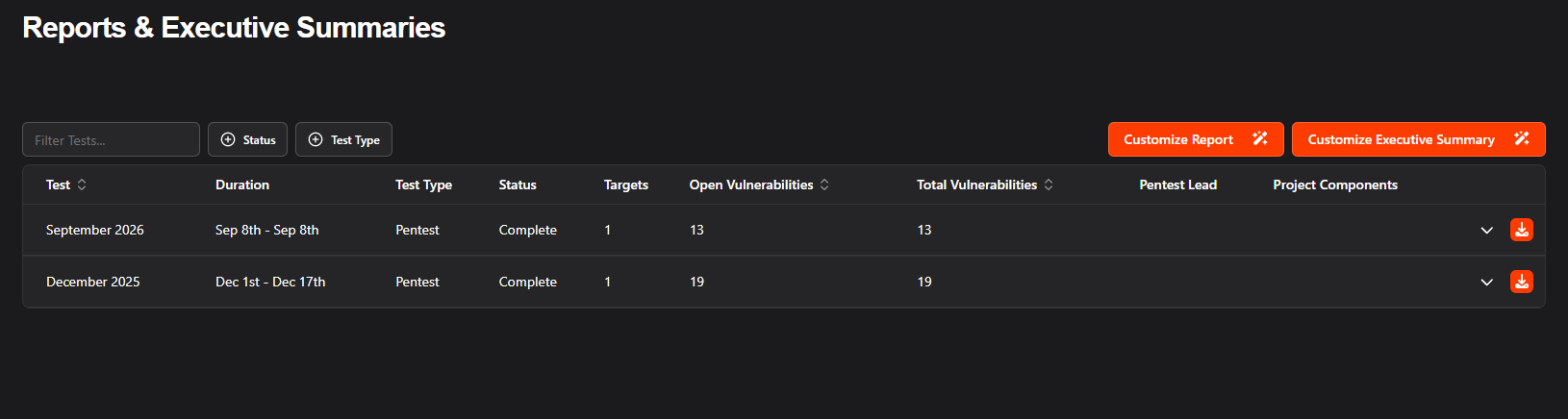
You can also download historical PDF reports and review testing dates, scope, vulnerability results, and remediation status. Over multiple testing cycles, this gives you a record of how your security program has changed rather than a collection of disconnected pentest reports.
Give Stakeholders the Right Level of Detail
The Portal gives you meaningful control over what your reports contain and who they're intended for. From the Reports & Executive Summaries tab, you can:
- Download the full internal report: the complete technical document for your security and engineering teams
- Download an Executive Summary: a condensed, professionally formatted version designed for leadership, customers, auditors, and other stakeholders who need the headline findings without the full technical detail.
- Add your own text: insert custom context, commentary, or organizational language directly into the report before sharing it
- Report by project component: generate a report scoped to a specific component of your project rather than the full scope. For example, if your project includes an external network, a web application, and a mobile app, you can produce a standalone report for just the external network. This is useful when components are on different remediation timelines, were inherited through an acquisition, or need to be presented separately for a compliance audit.
Together, historical reports, Executive Summaries, and compliance mapping can help answer:
- What was tested, and when?
- What vulnerabilities were identified?
- What was remediated?
- What was retested and validated?
- How has the program changed over time?
Connect Remediation to Your Development Workflow
Security issues are easier to manage when they fit into the workflows your development and compliance teams already use. The Portal integrates with several common tools:
- Jira
- Azure DevOps
- GitHub
- Linear
- Microsoft Teams
- Vanta and Drata
Turn Individual Pentests Into a Long-Term Security Program
A mature security program doesn't treat every pentest as an isolated event.
Instead, each assessment feeds into the next cycle:
Test → Identify → Remediate → Retest → Measure → Test Again
The Portal supports each part of that process.
For organizations that need more frequent visibility, PTaaS provides quarterly penetration testing so new vulnerabilities can be identified as products and environments change. The Portal provides continuity between testing cycles: what was found, what was fixed, what was validated, and what still needs attention.
Complementary Security Services
Penetration testing can also be supported by other security activities throughout the development lifecycle:
- Secure Code Reviews: Identify vulnerabilities earlier in development
- Secure Cloud Reviews: Identify configuration and architecture risks in cloud environments
- Developer Training: Build secure coding practices and reduce recurring issues
- Compliance Readiness Support: Prepare for SOC 2, ISO 27001, PCI DSS, and other requirements using documented security evidence
The goal is to create a repeatable process for identifying risk, addressing it, validating the work, and measuring what changes.
Frequently Asked Questions
How can I track my security program over time?
The Software Secured Portal combines vulnerability tracking, SLA monitoring, pentest history, retesting, project activity, and historical reports. Together, these features show what was identified, what was remediated, what was validated, and how results change across testing cycles.
How does the Portal track vulnerability remediation?
Each vulnerability maintains a history of its status, SLA performance, Labels, Notes, and risk acceptance decisions. You can also connect vulnerabilities to Jira, GitHub, or Azure DevOps and retest them after remediation.
Can I track whether vulnerabilities are being remediated within SLA?
Yes. The SLA Summary provides both a simple count view and a detailed breakdown by severity, so you can see exactly where your team stands relative to agreed-upon remediation timeframes. Individual vulnerabilities also display their current SLA status (Compliant, At Risk, or Overdue). If Software Secured's default SLA timeframes don't match your internal vulnerability management policy, you can customize them directly in the Portal to reflect the remediation windows your organization actually works to.
Can I compare results from multiple pentests?
Yes. The Reports & Executive Summaries tab includes a test range selector that lets you review a specific pentest or multiple tests within a defined date range. Pentest History also shows vulnerabilities identified and remediated across testing cycles.
Can I retest vulnerabilities after they are fixed?
Yes. You can retest all vulnerabilities in a project or select a specific subset. Once the retest is complete, vulnerability statuses update, and a new report is generated. Standard includes one retest round, Standard Plus includes three, and PTaaS and Premium plans include unlimited retesting.
Can I connect Software Secured vulnerabilities to Jira or GitHub?
Yes. The Portal integrates with Jira, GitHub, Linear, and Azure DevOps, allowing you to connect vulnerabilities to existing development workflows. Microsoft Teams is also available for Portal notifications.
How does the Portal help with compliance?
The Portal maintains historical testing and remediation records to support audits and compliance activities. Vulnerabilities can be mapped to frameworks such as SOC 2, ISO 27001, and PCI DSS, and SLA tracking provides visibility into remediation performance.
Conclusion: Measure Security Progress, Not Just Vulnerabilities
A penetration test shows where your security program stood at a specific point in time. The Software Secured Portal gives you a record of that process: vulnerabilities identified, remediation decisions made, SLAs tracked, fixes retested, and results compared across testing cycles.
That history turns individual pentests into evidence of how your security program is improving over time.
Ready to get in touch? Get started by booking a consultation now.
About the author

Kaycie Waldman
Demand Generation Manager
Kaycie Waldman works closely with SaaS, cloud, and technology organizations on security, risk, and compliance initiatives that support growth and enterprise readiness. Her work spans strategic content, go-to-market initiatives, and customer trust programs designed to support scale, compliance, and enterprise sales.
%20(1).avif)

.avif)